Using App-templates of ArcGIS Online – Geoform & Crowd source Reporter

ESRI now provides various resources and templates for users for spatial usage

And as how to connect data to people is one important part, and our project is to create a system, where users can submit their comments about ourplannings.
So, Geoform and Crowd source reporter is tested, and here are some experiences and tipps.
Geoform
It is relatively easy. but in the creation theres many ways, from csv, or build the GUID relation with Arcmap. My limit is that with Basic license can’t create the full funciton, and csv can’t make domain or reject null value.
One convenient method is create with Survey123, which will also take the benefit of the analyze panel in it.
My method is to create the fields in Arcmap, then upload the feature layer, then activate attachments, this is the easiest way to create feature ready for Geoform.
With Feature ready, Webmap created, simply generate App from templates. Follow the instructions and test out a bit, the tip is that the setting of the Survey lies in the pop up of the Webmap
————————————————————————————————————————
Crowd Source Reporter
this is a bit more complicated, with simple creation can’t create an available app.
first need to create a group and share the feature layer and Webmap
Click share as, create Web-App, then the Crowdsource Reporter can be created.
the functions are quite straight forward, if theres a number field the twitter heart can be added to it
and also the comments on one field.
As in the previous article, it is rejected for the size of the panel and the lack of widgets.
Or else this view and function is quite interesting for users.
And all the fields are all edited in the pop-ups.
————————————————————————————————————————-
When I was looking for crowdsource reporter related sources, there aren’t many, only one video helped me,:
Actually the main thing is to create a group and put everything in it
the rest is to edit the pop-ups in the editable layer.
first I used the layer fieldworker from Survey123, later I created own layers as in the Smart Editor 
The limitation of these two is that only point data is supported.
With Smart Editor it is the final choice, with less change to the original format of the app, with only one new widget.
But the App-templates can have more functions, and also if JavaScript ability is included, it can be more creative and hosted more freely.

Creating Survey123, and the data for other ArcGIS Online usages

The previous article is a summary and comparison of choices

This part will explain what will be created and some usages, opinions

To start with Survey123, the clearance of Web-Survey and App-Survey is important

The two I would say is completely two different service with similar looks.

The web version will be created just in the browser, with various options

Playing in the layouts and questions, I will put on a thing I spent some time to figure out: add my Webmap as a geopoint basemap.

First create a group, share the map you want to use to this group

Go to Organisation/setting/Maps set the group to your group instead of ESRI standard

And then go back to the Survey123, it will be available!
In the other tabs of Survey123 I would say it’s really intuitive, if there’S any question, contact me!
———————————————————————————————————————–
And now the second part of this article will be about the Survey123 for ArcGIS app
It is created to set in phone, tablet apps.
the main issue for me is the basemap, which it used difference sources. others they are similar layout, but different base. 
The basemap can use a hosted tile layer, or create a tile package with ArcMap
save it in the folder of data, an then it can be uploaded, and the basemap is shown
and other more detailed editting can be set in the .info file
with phone app it could be downloaded within the app.
———————————————————————————————————————–
Once the Survey is editted in the app, the web browser can no longer edit it, can only view the analysis and data.
That is the reason I say the two method is two version of Survey123, app more similar to Collector app, while the web version is more like the google survey form.
———————————————————————————————————————–

now back to the content of AGOL, one folder is created with the name: Surve – _____(name of your survey)

contents are ___, ___-fieldworker, ____(type Form)

the form can be opened in the options:

And the feature layer and the fieldworker is linked in the Survey, but they can also be added to Webmaps, and contain different data.

————————————————————————————————————————
Webhook

Integromat
create one new scenrio, and log in AGOL, get the survey, then connect to the Gmail/ Outlook or whatever trigger

The content, reciever can use the info of the survey. here would mention one function: ifempty
I have a text field or number saying the road id, or description. choose one of the two.

One thing else, is Name, use the whole field instead of the First name, Last name. Or else the space in the text field will not be accepted in integromat

Microsoft Flow

sign in, create the flow, it is prettey intuitive also.

There are plenty more options, but for feature layer is still not available, I created a script for usage other than Survey123 using the arcgis API.
————————————————————————————————————————
The creation of Survey123 is quite easy, and the setting are not so customizable.

Geopoint in computer view is too small, comparing to Geoform having a full screen function.

Webhook is one of the most convenient function in AGOL, which is said to be applied to all Feature layer in the short future.

Using Smart Editor to create a survey form in ArcGIS Online

The previous article is a summary and comparison of the option in ArcGIS Online

This part will focus on the settings of the Smart Editor.

The online tutorials shown that some would require a standard license, but it is actually achievable with basic license, with the rest settings online.

The first step is to create the feature class to store the survey.

Simply use create new feature class, Smart Editor support point, line, and polygon.

To create a drop list by using domains, here won’t cover how to set a domain, but just a quick hint, database>properties.

To make one field is required, make Enable NULL Value option to no. There is one limitation, that it can only be set when creating a new field, and also the feature class can not have any objects. this can’t be changed after wards, also not changeable in ArcGIS Online

A placeholder can be set with default value, in my case I set:
I accept data protection to first none, they need to manually switch it to yes
and
in the comments column, set with max 1000 characters.

Creating more Feature classes with the same attribute is also easy, just use import when creating a feature class, all settings include default value, nullable will be imported.

After the feature layer is set, publish it as a service
the setting here is:
Feature Access but not Tiling.

To keep the data safe, allow only add new feature, no update or delete

After uploaded, it will be the settings in AGOL

one issue found is that attributes can still be seen in smart editor, so others name and email can’t be really hidden, we will have few extra steps to avoid it

the important settings here is
activate edit
allow only add features
Features not visible

then switch back to overview tab

I set three features: point, polyline. polygon with same attributes in this Feature. but the features are not available to the public. We want to show that there’s really opinions from others, but hiding the detailed comments, we need to create a hosted feature layer views. Pop-ups can be set in the newly created view layer, in the visualization tab.

then prepare the webmap, add the both view layer and feature layer, and all the other layers and settings preferred.

while the Webmap is set as your wish, now its time to create an app, with the Web AppBuilder

The design, map set as your preference, this part will skip to the Widget, check the layers you want at Editor, and in the description, html scripts can be put and shown

and in actions, attributes can be shown but not viewable, but not hidden but editable.

there can be more field-based action added.

Intersection: same as spatial join in ArcMap
Address and  Coordination are location systematic data
And preset can save the users some time, in our case is the Name & Email, when a user wants to submit multiple comments, it can be used. Another benefit for this function, is that it applies to all layers with the same field name, so all my three layers can share this benefit without showing multiple inputs.

Using the hide/required actions can be used to create relations between questions, for example: comment type is Others, then the Specify field can be made necessary

The attribute actions are set here

there are more editing in the Widget, this can set a template for the templates fields mentions. In our case Name and Email of course is different for all users, but other properties can be set here. And the description here is also available for html styling.

the eventual form can be view as here

So we got a formatted survey widget into our app, hooray!

Remember I mentioned about hosted view layer? if not created and added, either you won’t see any comments as an anonymous user, or you will be able to sneak onto others complete input data depends on your setting of the feature layer.

So that would be the method to create a survey for our Web App!
other articles covering Survey123, App-Templates will come out soon!

Methods to collect data from users in ArcGIS Online: Survey123, Geoform, Crowd-source reporter app, and Smart Editor

The background of this task is to collect comments from the residents about our planning.

And the final result will be about Survey123, Geoform, Crowd-source reporter app, and smart editor.

In our system we provide a list of features as basemap and information, combining with our analysis and planning, deployed as an ArcGIS Webmap, and serve to the citizens.

The original system before is that ObjectID is shown on the map as Labels, and the citizens will type in their name, email, road ID and their comments. Then the server will send this email to our company mailbox, and our staff will collect them into one excel file.

road ID on map

The comment questionnaire is embed in the portal

The potential loss of data lies there, for typo in the road ID/ email address, or server-side failure causes. And also, one person copying emails to an excel file is simply too much manual effort.

Looking into options of data collection in ArcGIS online, the first thing came out is the Report Feature widget. (It’s called Feature-Feedback in the German version, therefore created some misunderstanding)

In the description says that it can Review Feature (add/delete/move/reshape), and then put on notes for severity. Unfortunately our license is not available to test this widget.

This is NOT the function we need, this will allow users to get a more detailed report of the features in the the map, but not giving back to the provider, which is us. a video here show how it is:

And later the real available functions found are the Survey123, Geoform, Crowd-source reporter app, and Smart Editor, in this article will be a summary and comparison. The settings will be in later articles.

In the description of ESRI says that it is a form centric solution, working even offline and on various platforms and languages.
The benefit of this is that it is really easy to create, setting-free when using website version, can be deployed very fast.
The built-in columns for Survey123
The second great part about it is the Data panel, it will show all the data, even showing word clouds of the replies.
The third benefit is the Webhook function, it can be set connecting to servers like Integromat, Microsoft Flow, and send back replies automatically with the desired form.
but the limitations of the Survey123 which eventually made us give up on it, lies in the geopoint function.
As we already use sophisticated Webmaps for the citizens, we need to apply it to our new features also, but the basemap can only be viewed without legends and pop-ups, and the size can’t be set to full screen. (Setting of the basemap using customized Webmap will be explained in further articles)
And while testing, the confusion also lies in Web-mode and App-mode. The App mode can be more customized into a JSON level. But it requires a downloading the software Survey123 for ArcGIS(and somehow my company anti-virus says its not trusted). Once a Suvey is edited in App-mode, it can’t be edit in Web-mode anymore. And eventhough it can accept self upload tiles from ArcMap as basemap, it can online be shown on other apps in the Survey123 app in android or IOS, not in web.
This I would say it is still more a ArcGIS-collector-like function in this time, can’t be really customized so much, but the convenience and the tidiness is great.
this is an App-template for ArcGIS Online, mostly same to the Survey123 format, but less dedicated questionnar, the format like E-mail/ Stars/Signatures are not there, and no Webhook is connected.
The good part about using Geoform is that the geopoint function can be full-screened. And the View submittion can view the Complete Webmap information.
The tidiness and cross-platform/ language is still an appealing function, but the eventual reason let us gave it up is the pop-up. In this template, pop-ups can only set on the submitted survey points.
We have a function to show street view pictures in the pop-up. As this is the main feature of our service, we can’t give it up.
I view Geoform as a more developed background for Survey123, once Survey123 added the view submit and full screen function, Geoform is out-dated.
comparing to the previous two, this is a more sophisticated app-template. The users will require a little more knowledge and ability for GIS.
As the main function of this app is ‘crowdsource’, therefore, collecting data is basic.
The features worth mentioning is:
Synchronized geopoint: the point pointed on map is automatically pinned when geopoint opened.
Like/Comment: it took a twitter-like form to create a more interactive frontend
Pop-up edit: all the form in crowd source reporter is used in pop up, therefore it is easy configure.
Log-in: the users can log in through ArcGIS account and other social medias
This template shown a professional look, and also more editable features.
What eventually not accepted is because it can’t add the compare widget, which the chef preffered really A LOT, and the survey form took out too much space.
comparing to the templates, this is only a widget, so called back to basic.
The functions of this widget includes more setting adjustments. With the correct adjustments, it is the final decision for our usage.
And the Webhook funciton is also not included, but with arcgis python API, I set an interval of 30 mins and login, get the newly filled data, and send formated email reply.
The settings will be written in later articles. In here would be a sneak peek: Auto fill in intersect attribute, preset.
Conclusion
ESRI provides various services for users, coding and none-coding. The complicity is to find the real way to apply the usages, though ESRI provides detailed documentaion.
the comparison of usage is as this table

Type
Functionality
Complicity
Customize
Survey123
Service Form(Web or App)
Webhook + Analysis
Low
Low
Geoform
App-Template
View Submission
Low
Low
Crowsource
App-Template
Log in 
High
Mid
Smart-Editor
Widget
More interactive attribute
Middle
High

the App-template can be downloaded from Github and edit, then deploy on ArcGIS Online or other server, but I’m not a Javascript programmer, so this is not included in this article.
And also when Javascript ability is available, there is a more preferred library called Leaflet this provide provide the most customization abilty, but also require high JavaScript abilty. 
ESRI products in my opinion is offering an easier way for non-programmers to still achieve the goal, either for spatial analysis or interactive webmap visualization. It may not be so as imagined, but can usually create similar output, it may not be as efficient as writing scripts, but it provides the platform.
As an user of Arcmap for more than 10 years, theres benefit and also more to improve. Learning python advanced my skill and more possibilty, but still ArcGIS provides great service.

RealSense learning/turtorial/sharing blog – Chapter Two: More Device Adjustments

So, after the hello world, more controls over the device.

So the pipeline is basically start/stop, and wait_for_frames

And the function of pipeline_profile I haven’t know yet

in this part I will put in the controls before wait_for_frames,

including record file, read file, and others
First, complete the configuration:

Rs.config


enable_stream
Define the stream type and also width/height…
enable_all_streams
Turn on all streams at once
enable_device
Input “serial”
enable_device_from_file
(“filename”,True/False) for repeat_playback or not, either once to the end, or keep looping
enable_record_to_file
(“filename.bag”)
disable_stream
(“stream”,”index”)
disable_all_streams
resolve
can_resolve

the enable stream is mentions before,

config.enable_stream(rs.stream.depth, 640, 360, rs.format.z16, 30)

config.enable_stream(rs.stream.color, 640, 480, rs.format.bgr8, 30)

The options can be found in the Intel Realsense Viewer, color,depth,infrared, resolution, mode, fps.

and the  rest is more related when multiple devices were used
config.enable_record_to_file(file_name)
config.enable_from_device(filename)

these are when recording or reading
enable from device have the option True/False
allow replay or just loop once through all the frame and end
If False, it will be the Runtimeerror of “no frames arrived in 5000″
thats why I had the except in the try loop
——————————————————————————————————————–
device = profile.get_device()

depth_sensor = device.first_depth_sensor()

depth_sensor.set_option(rs.option.visual_preset, 4)

dev_range = depth_sensor.get_option_range(rs.option.visual_preset)

preset_name = depth_sensor.get_option_value_description(rs.option.visual_preset, 4)

https://github.com/IntelRealSense/librealsense/wiki/D400-Series-Visual-Presets#related-discussion

This part is setting the preset as in the Realsense Viewer, and in my need is the preset 4, high density.

The dorodnic of intel he wrote on loop to loop through the presets.


which he mentioned the preset numbers are changing all the time, I suppose its among other devices, at least in this same machine it stays

recorder = device.as_recorder()
pause = rs.recorder.pause(recorder)
playback = device.as_playback()
playback.set_real_time(False)
playback.pause()
playback.resume()

Recorder will start recording when in the configuration set,with function or .pause() and .resume()

And the next is playback

This is playing the recorded bag file


pause
Pause and resume, while resume it always turn really slow and lag, until it catch up with the frames
resume
file_name
I haven’t use these functions
get_position
get_duration
is_real_time
Set to the real time behavior as recorded time
set_real_time
Usually I set to set_real_time(False) so I can go through each frame to measure, or else the pipeline will keep the frames looping as real time behavior when its (True)
config.enable_record_to_file(file_name)
So I suppose it can open one bag and record this playback to a new file, while
rs.config.enable_device_from_file(config, ‘123.bag’)
Does Not enable the same time
config.enable_record_to_file(file_name)
current_status


Intrinsic/Extrinsic

depth_stream = profile.get_stream(rs.stream.depth)
inst = rs.video_stream_profile.intrinsics
#get intrinsics of the frames
depth_intrin = depth_frame.profile.as_video_stream_profile().intrinsics
color_intrin = color_frame.profile.as_video_stream_profile().intrinsics
depth_to_color_extrin = depth_frame.profile.get_extrinsics_to(color_frame.profile)

These are getting some data of the camera and streams, i use intrinsic to get the calibration while projecting pixels to 3D coordinations

Otherwise I have no other use for them yet, as I go through the files the usage would be more in 3D models also, while creating by scanning, the accuracy is a lot more important in smaller scales

——————————————————————————————————————
So this part is without example codes because it’s a more general usage for all files
which will be used in most further codes I will be demonstrating.
and I just got the use of turn off auto exposure today, will put it in in the future
the usage of turning it off is for not drop frames.
this is also one of my major issues 
I need to make it act as a camera, and every frame I took should be reachable
but the wait_for_frame is currently not giving me all the frames, and also not recording or recorded too much
if any pros saw this, please write in the comments or send me an email about this topic.
thank you!

RealSense learning/turtorial/sharing blog – Chapter One:The Start, Install and Hello World

It’s been one month I’ve been working on this Intel realsense D435, and still I’m not so sure with a lot of functions and some parameters. Like when to add () and when not, which function need which

parameter to fit in. First I read the

https://buildmedia.readthedocs.org/media/pdf/pyrealsense/dev/pyrealsense.pdf

And the python.cpp in the python wrapper to find the options Actually it didn’t help much, mainly I started with the examples in python wrapper and then read the corresponding codes in the C++ example. It is also because this project is to measure objects in the picture, and in the example there is already one measuring in stream, so translating that code is the first approach. And here

https://pyrealsense.readthedocs.io/en/master/index.html

The starting part of the camera:

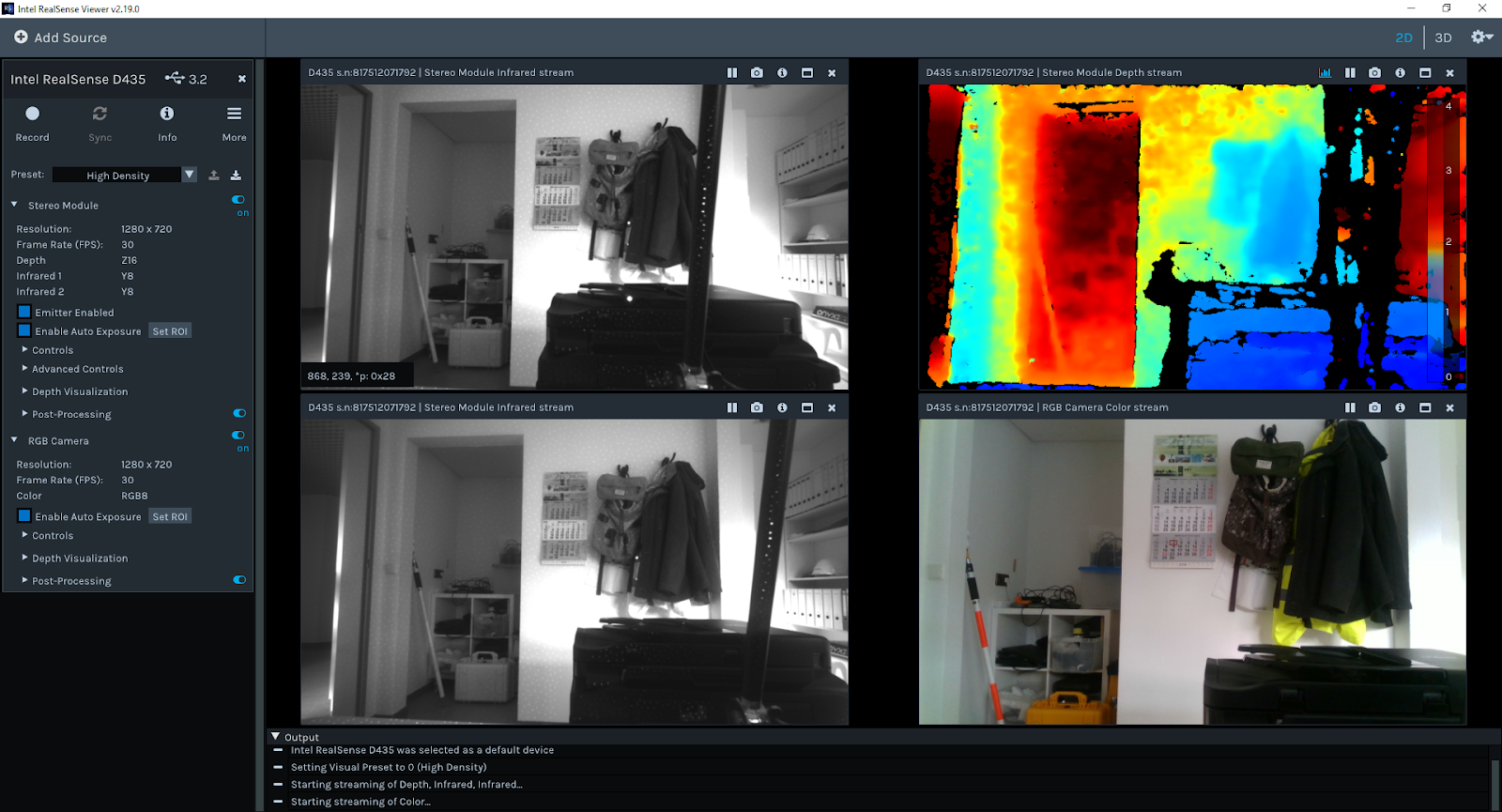
With the Intel Realsense Viewer we can get all the possible control options

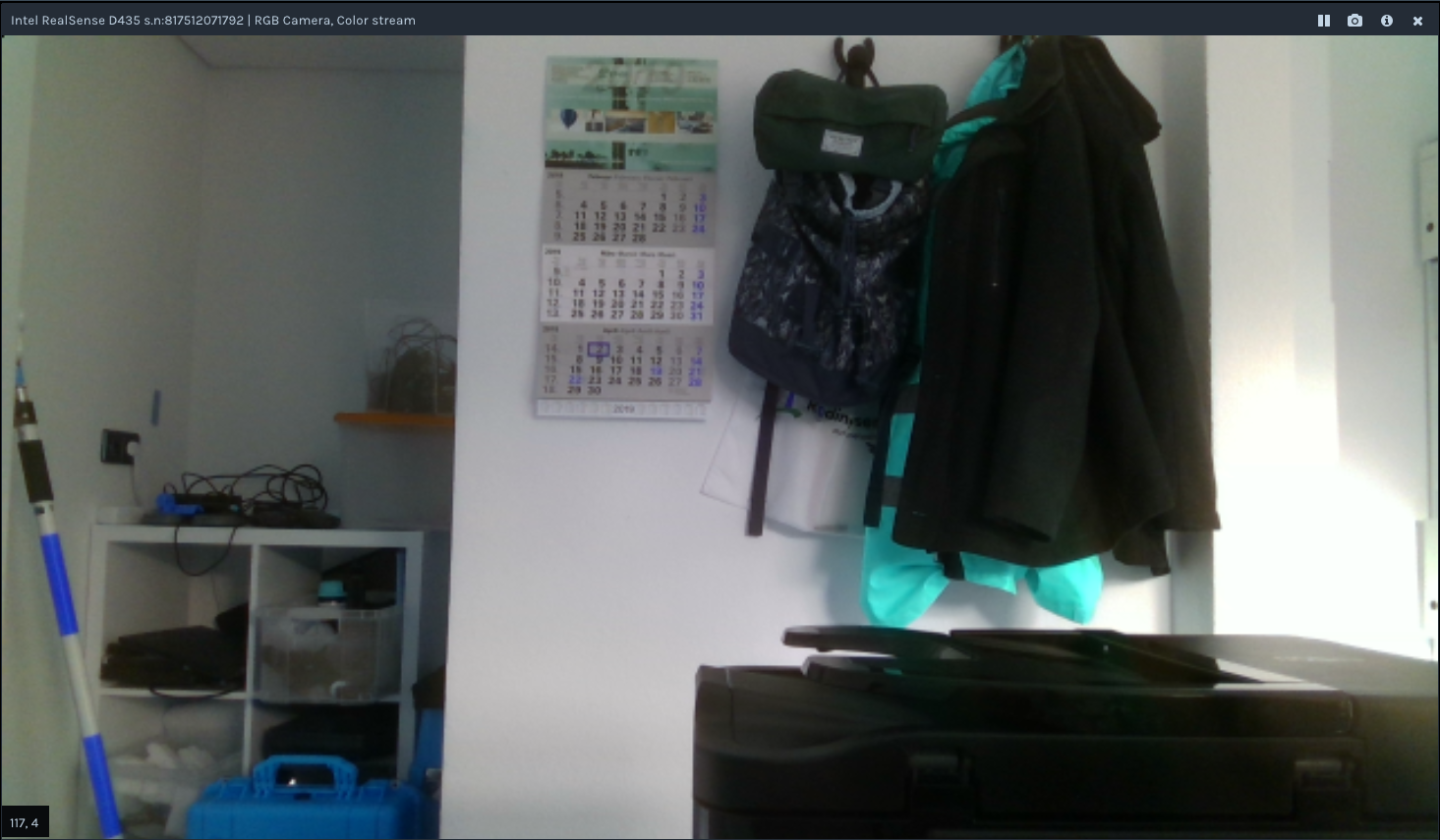
the picture of IR/Depth/RGB stream

For RGB the highest resolution can be up to 1920*1080
auto exposure sometimes is turned off to reduce frame drop

In my measuring usage I will be using the High density to get the most pixels covered
while determine movement or object can use high accuracy
and the presets can be also set manually

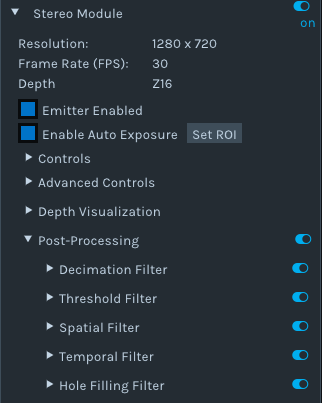
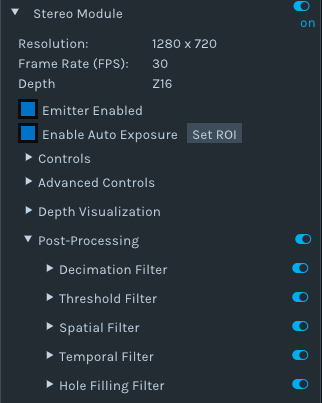
one important feature for me is the hole filling, to get the most of the measurements this algorithm is a way to fill the frame 
before

after 

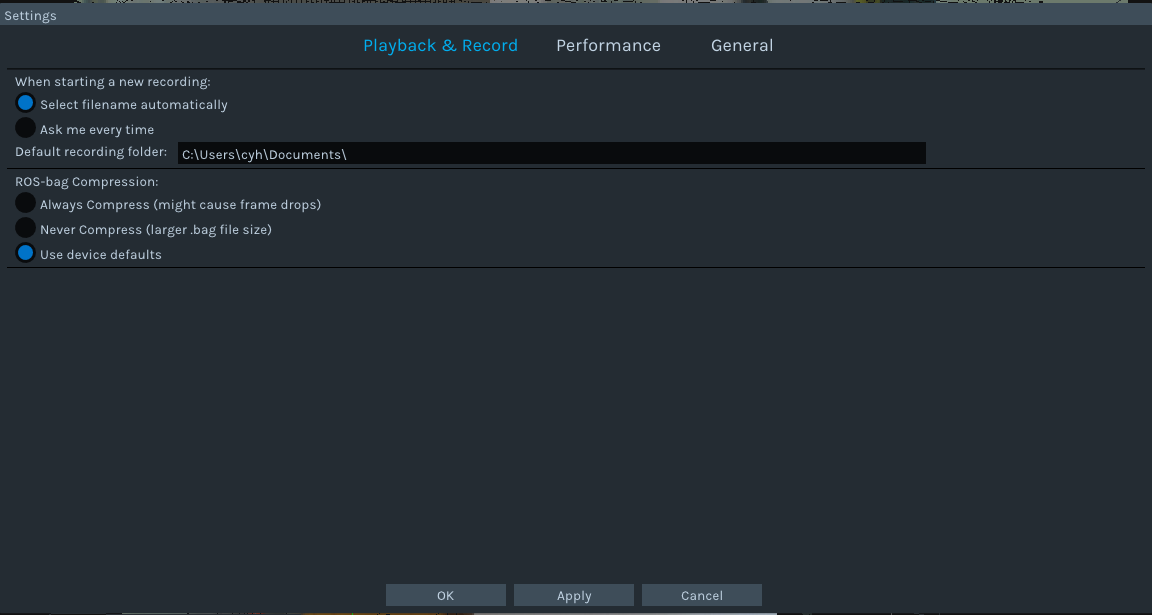
it can already record and choose the save directory

the view also come in 3D, for the usage of point cloud

least but not the last, the depth viewer, currently I havent been using it, since its like the viewer without the color stream control.

Setting of the environment

Pip install pyrealsense2

This is the current easiest way to install it, while the other method is through CMake which I never tested

Other plugins needed will be: numpy, opencv-python, matplotlib

Also can be done with pip install

————————————————————————————————————————

So start scripting:

My first example is to rewrite the Hello World into python

https://github.com/soarwing52/RealsensePython/blob/master/phase%201/Hello%20World.py

Import pyrealsense2 as rs

This is the library import line for realsense, in all further scripts it will be all in this form

The pipeline:

For video processing all the instructions are in a pipeline, so start it and combine the next moves.

Pipeline = rs.pipeline()

pipeline.start()

And then the configurations of the pipeline:

config = rs.config()

config.enable_stream()

This sets up streams of frames which not only when using camera but also when reading from bag files, mainly I use for alignment of frames, other I still haven’t found the function for it

Parameters:

(stream type,resolution, image format, fps)

Example:

config.enable_stream(rs.stream.depth, 640, 360, rs.format.z16, 30)

config.enable_stream(rs.stream.color, 640, 480, rs.format.bgr8, 30)

The possible can be found in the Intel Realsense Viewer, color,depth,infrared.

One thing I found interesting is that when it in default is the bgr format

in Intel Viewer it shows bgr in rgb, which means where red is blue and the colors are not correct to human eye.

So when I record as rgb8/rgba8, and view in opencv-python, it shows also again wrong, shows rgb in bgr format.

and when I use matplotlib, it showed rgb as default view.

so I need to add one cv2.convert if I want to show RGB image correctly in opencv window.

It is not a big problem just one interesting phenomenon

https://www.learnopencv.com/why-does-opencv-use-bgr-color-format/

RGB/Y16/BGR

In order to get the frames one after one, perform as a stream/video, a try and a while loop is required

Try:

while True:

Except Runtimeerror:

No frames came or ended

Finally:

pipeline.stop()

So for getting the frames

frame = pipeline.wait_for_frames()

depth_frame = frame.get_depth_frame()

color_frame = frame.get_color_frame()

This is quite straightforward

The get frame options for pipeline are:

poll_for_frames()

Get frames immediately

Somehow I can’t make it work, it just always reply no frames coming until the end

wait_for_frames()

It will block the stream until the next stream came, this caused a matching problem which I will describe later when I tested measuring

try_wait_for_frames

I haven’t really get to know this one yet

This is also same options for the syncer, but as I wrote before, I can’t get the syncer to function yet.

For frame queue there are more options

rs.frame_queue()

This will put the frames first in memory and then process and save, if there’s a lot of frames while streaming, this is the method to prevent drop frames since it saves the frame data first.

In this project I didn’t need this function, just came across it while searching

So back to the Hello World sample.

width = depth_frame.get_width()

height = depth_frame.get_height()

dist = depth_frame.get_distance(width / 2, height / 2)

This is getting attribute from frames

The options are

get_width

get_height

get_stride_in_bytes

get_bits_per_pixel

get_bytes_per_pixel

And for the metadata of the frames:

var = rs.frame.get_frame_number(color_frame)

print ‘frame number: ‘+ str(var)

time_stamp = rs.frame.get_timestamp(color_frame)

time = datetime.now()

print ‘timestamp: ‘ + str(time_stamp)

domain = rs.frame.get_frame_timestamp_domain(color_frame)

print domain

meta = rs.frame.get_data(color_frame)

print ‘metadata: ‘ + str(meta)

Frame number, timestamp are the ones I used, others I haven’t get my hands on yet

The get_distance is only for depth_frames while the others apply to all other frames.

So this can get the basic distance. But for accuracy, even though it shows the number up to 76,

The detecting distance of D435 is 10 meters, and for my test, it’s accurate within 5-6m up to +-10cm on measuring objects

key = cv2.waitKey(1)

This is window controlling, with 1 means 1ms the window will show, and 0 means forever

if key & 0xFF == ord(‘q’) or key == 27:

Break

This means when esc/q is pressed, exit the while loop, and proceed to next frame because there is a try outside of the while loop.

2016/10-2019/01 the house of Adam-Opel

Well well well, this is a house of stories

two years in here, gives me a lot of adventures

so this is the article for “public-available stories"

————————————————————————————————————————–

so first, 195 per month, unbeatable in Frankfurt

and the room, big enough

our hallway, we had some epic water slides here

my room, the double bed is from the street, I found it and carried it home

The fridge and the microwave I got from friends, the fridge was unplugged with food inside, they said: keep it if you want it
so I washed it

the story of the mannequin
heres a closet

————————————————————————————————————————-
I started this story in this article
https://soarwing52.blogspot.com/2017/04/adam-opel-strasse-room-of-king-and_28.html

that was before I left my prints here

and in the two years, people come, people left

first is Kamal left for his job at 2017, while i was in Turkey

and when I’m back, Dustin also decided to move out, and we made one of the biggest party in the house

there was a castle

a dragon

and I’m the dragon

After that, we had two Christmas big dinner,

2016
2018

this family grows

we did many crazy things that other places wont even think of

dropping a tower from the window?

turning aisle into water slide?

Well, the two years here, quite nice

and of course, my last night

one night, two groups

https://soarwing52.blogspot.com/2019/02/chapter-frankfurt-one-step-of-life_8.html

I said what should be said here, still, its not goodbye
————————————————————————————————————————–
this house, though I’m not like the 8.5 year Dustin, I also spent part of my life here

from this room

 to this room

that’s how my life started in Germany, this house gave me a start, a pressure free space

which there is basically no rules, to accept all the challenges

I think, this is something worth remembering.

Chapter Frankfurt: one step of life, people come, and leave

Chapter Frankfurt:

in this part of the story, I lived a different life, even for a student in Germany.

The house of Adam-Opel-Straße, is where it started, brings us happiness and pain in the ass. And the reason my life can be such an adventure.

But what can be carried out, it because of our community.

FH, the Uni is the main reason but turned out to be the smallest part of this adventure, we all studied, worked, loved and went on.

Among the adventure, there must be a safe house, and my friends from Taiwan, provided the calm and

safeness, we were brought together because we’re here together in Frankfurt, or else we’ll never get to know each other for we all are so different yet in the same city. Nationally is only a name, but there’s somewhat in us made us friends and family.

For everyone been here, stayed, we all share some bond, the fact that we’ve became together, I’d say, thank you all, for being in my life making it better.

—————————————————————————————————————————————

Well, among the touching words, life is still a moving wheel.

after the first week of office life, there are more words.

So first introduce the daily in the office, usually starts around 8-9, ends at 17-18. With 15 minute breakfast and 30 minutes lunch break.

and Friday people all leave around 13:00.

Its quite a descent job for the first week, no technical issues in ArcGIS, pretty familiar with the software and everything.

Though the job is really basic, but I guess when doing location information, the local database is always needed to be created.

The atmosphere is quiet in the office, not challenging but getting use to an all German working environment

so far, good

—————————————————————————————————————————————-

and the new place, its the first time I really stayed in a german WG, shared apartment.

everything is big and nice.

the owner is a lady who lives with her mom downstairs.

currently the roommates are a guy call Mohhamad, which I only seen once, a german girl moved in the same day as me, and one Croatian couple, which is old enough to be my grandparents.

—————————————————————————————————————————————-

the quiet nights in this new room, there’s much to think about.

and also this is the time of Chinese new year

something ends, something starts.

in the past two years, every one just bypass each others life in this busy city.

the first year, kind of the first taste of new life here, trying everything.

after the exchange, back here, and start to be more serious for the next steps of life.

and also because I’m not so into the Erasmus group and the german language class classmates are less

my friends became the Taiwanese around, and my Adam-Opel group.

I had a lot of quiet time in my room back in Adam-Opel also, but this now here is different.
being more pragmatic now, facing what will be in front of me, and looking at whos beside me.

Allen once asked me if we do a film of the Franfurters of our friends, but its kind of hard.

we are all friends, we had fun together, but what will be the thing that bring us more together?

only same all are Taiwanese? yet we are still very different.

so to leave a mark is kind of hard. So we end up making dumplings together.

Its nice to have everyone around, yet after the meal, we all go back to our own ways to our life in here.

And for the Adam-Opel fight club, we had great times, and I believe we will always be the same no matter how we moved,so I’m not worried at all.

As I said, this is not the end, it’s just one chapter.

after this chapter, which characters will keep on showing up in the next, and maybe who will jump back after a few pages, who knows?

still, my attitude is stay open, and embrace what will come.

Always I tried my best, or even always better than my best, and I can’t afford to worry about the result, it’s just to overwhelming when I used all my energy on my efforts.

So, this chapter for me, is a reminder, a milestone, and a tombstone for the 2 years in Frankfurt.

and this is also a message, for my friends, the moments were kept in mind, and the future pages are still empty,

invitation awaits here, who will be in the next page?