最近又有機會做到深度相機,就先回去看以前的realsense
今天剛好在找規格的時候看到這篇新聞
https://chinese.engadget.com/intel-realsense-shutdown-040043006.html
今天剛剛好 就看到了 要終止的消息
當初帶領我進入python的難關,現在也要終止了
一直到今天我都獲益良多
最近又有機會做到深度相機,就先回去看以前的realsense
今天剛好在找規格的時候看到這篇新聞
https://chinese.engadget.com/intel-realsense-shutdown-040043006.html
今天剛剛好 就看到了 要終止的消息
當初帶領我進入python的難關,現在也要終止了
一直到今天我都獲益良多
GUI: graphic user interface
要給其他同事使用務必要做成有介面 所以就在主要程式都完成後,開始這部分
我做了兩版,Tkinter跟PyQt
Tkinter真的太2000年了 雖然是內建很方便,但是就是要用新一點的
最後做出來的是如下:

GitHub https://github.com/soarwing52/RealsensePython/blob/master/proccessor.py
這是我這半年來主要的大專案,中間用了許多不同的組成,分成許多小專案開發
目前公司的主要業務為道路調查,類似街景車的在各道路、產業道路拍照
而本案的需求是公司想要有可以測量的照片
從硬體選購-深度相機程式開發與測試-實地測試-視覺化GUI製作由我獨立完成
中間有使用到的一些程式庫有:
電腦視覺 opencv
GPS Port應用
Realsense 程式庫
PyQt, Tkinter的GUI
Flask app
ArcGIS/QGIS 插件製作
The RealSense application is a solo project combined many different components I created during my job in the road surveying company
As the idea of the project is to let colleagues can measure objects such as road width, sidewalk, and even cracks.
Since the implementation can’t simply program through it, this project has:
Hardware selection, Computer Vision, Location Service, Depth Camera Library, GUI visualization
Further development with
ArcGIS/QGIS plugin creation, Flask web-framework
The RealSense application is a solo project combined many different components I created during my job in the road surveying company
As the idea of the project is to let colleagues can measure objects such as road width, sidewalk, and even cracks.
Since the implementation can’t simply program through it, this project has:
Hardware selection, Computer Vision, Location Service, Depth Camera Library, GUI visualization
Further development with
ArcGIS/QGIS plugin creation, Flask web-framework
身為一個程式新手,有機會碰到Raspberry Pi,就想做一個越級挑戰的計畫
最終從拿到Pi到現在做出一個大致可用的Prototype 現在六個禮拜啦
現在我來大致介紹一下我的專案
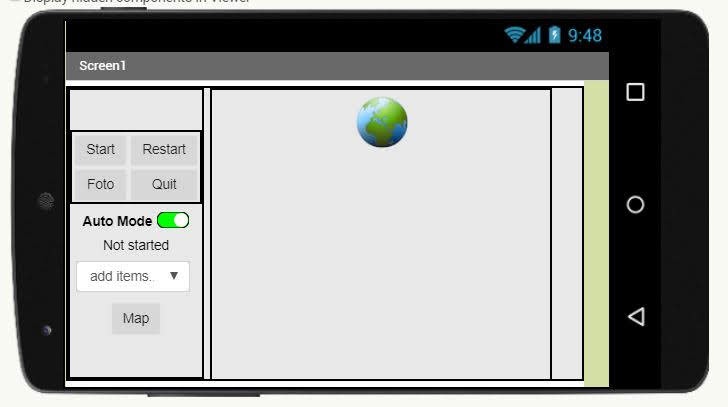
So when I found this, this is my savior
with no knowledge of JAVA I thought an app is impossible
but I found this youtube video
this showed that with Request of Simple HTTP server and GET request I can connect them
So he’s the inspiration of the whole project, thanks ADEL KASSAH!! 繼續閱讀 “Raspberry Pi + Realsense: MIT App Inventor"
So I finally get the chance to work on git more often.
before just working one the same laptop, or copy it to another like a noob.
Since Pi is not connected to the company network of files, and I dont have more usb sticks around, I use git now
So not only did this project helped me know more about tcp transmission
and also helped my old scripts
I based on the structure and with minimum change I made a pyQT version of the camera app

I would start first with the easy part, Flask
Flask is a micro framework to set up at server, app
and without setup like the whole Django file structure framework.
The good part is the variable they use is quite similar, because template of jinja2 and django is very similar
the code: https://github.com/soarwing52/Remote-Realsense/blob/master/flask_server.py 繼續閱讀 “Raspberry Pi + Realsense: Flask server"
The whole Realsense D435 project started long ago, I was working with it the whole year actually, and I have more records


@app.route('/auto/')
def auto(in_text):
    a.command = in_text
    return in_text
in this part I used dynamic link, so I don’t need to create tons of functions
 Jaythecheyi