Blog Feed

Using App-templates of ArcGIS Online – Geoform & Crowd source Reporter

ESRI now provides various resources and templates for users for spatial usage

And as how to connect data to people is one important part, and our project is to create a system, where users can submit their comments about ourplannings.
So, Geoform and Crowd source reporter is tested, and here are some experiences and tipps.
Geoform
It is relatively easy. but in the creation theres many ways, from csv, or build the GUID relation with Arcmap. My limit is that with Basic license can’t create the full funciton, and csv can’t make domain or reject null value.
One convenient method is create with Survey123, which will also take the benefit of the analyze panel in it.
My method is to create the fields in Arcmap, then upload the feature layer, then activate attachments, this is the easiest way to create feature ready for Geoform.
With Feature ready, Webmap created, simply generate App from templates. Follow the instructions and test out a bit, the tip is that the setting of the Survey lies in the pop up of the Webmap
————————————————————————————————————————
Crowd Source Reporter
this is a bit more complicated, with simple creation can’t create an available app.
first need to create a group and share the feature layer and Webmap
Click share as, create Web-App, then the Crowdsource Reporter can be created.
the functions are quite straight forward, if theres a number field the twitter heart can be added to it
and also the comments on one field.
As in the previous article, it is rejected for the size of the panel and the lack of widgets.
Or else this view and function is quite interesting for users.
And all the fields are all edited in the pop-ups.
————————————————————————————————————————-
When I was looking for crowdsource reporter related sources, there aren’t many, only one video helped me,:
Actually the main thing is to create a group and put everything in it
the rest is to edit the pop-ups in the editable layer.
first I used the layer fieldworker from Survey123, later I created own layers as in the Smart Editor 
The limitation of these two is that only point data is supported.
With Smart Editor it is the final choice, with less change to the original format of the app, with only one new widget.
But the App-templates can have more functions, and also if JavaScript ability is included, it can be more creative and hosted more freely.

Creating Survey123, and the data for other ArcGIS Online usages

The previous article is a summary and comparison of choices

This part will explain what will be created and some usages, opinions

To start with Survey123, the clearance of Web-Survey and App-Survey is important

The two I would say is completely two different service with similar looks.

The web version will be created just in the browser, with various options

Playing in the layouts and questions, I will put on a thing I spent some time to figure out: add my Webmap as a geopoint basemap.

First create a group, share the map you want to use to this group

Go to Organisation/setting/Maps set the group to your group instead of ESRI standard

And then go back to the Survey123, it will be available!
In the other tabs of Survey123 I would say it’s really intuitive, if there’S any question, contact me!
———————————————————————————————————————–
And now the second part of this article will be about the Survey123 for ArcGIS app
It is created to set in phone, tablet apps.
the main issue for me is the basemap, which it used difference sources. others they are similar layout, but different base. 
The basemap can use a hosted tile layer, or create a tile package with ArcMap
save it in the folder of data, an then it can be uploaded, and the basemap is shown
and other more detailed editting can be set in the .info file
with phone app it could be downloaded within the app.
———————————————————————————————————————–
Once the Survey is editted in the app, the web browser can no longer edit it, can only view the analysis and data.
That is the reason I say the two method is two version of Survey123, app more similar to Collector app, while the web version is more like the google survey form.
———————————————————————————————————————–

now back to the content of AGOL, one folder is created with the name: Surve – _____(name of your survey)

contents are ___, ___-fieldworker, ____(type Form)

the form can be opened in the options:

And the feature layer and the fieldworker is linked in the Survey, but they can also be added to Webmaps, and contain different data.

————————————————————————————————————————
Webhook

Integromat
create one new scenrio, and log in AGOL, get the survey, then connect to the Gmail/ Outlook or whatever trigger

The content, reciever can use the info of the survey. here would mention one function: ifempty
I have a text field or number saying the road id, or description. choose one of the two.

One thing else, is Name, use the whole field instead of the First name, Last name. Or else the space in the text field will not be accepted in integromat

Microsoft Flow

sign in, create the flow, it is prettey intuitive also.

There are plenty more options, but for feature layer is still not available, I created a script for usage other than Survey123 using the arcgis API.
————————————————————————————————————————
The creation of Survey123 is quite easy, and the setting are not so customizable.

Geopoint in computer view is too small, comparing to Geoform having a full screen function.

Webhook is one of the most convenient function in AGOL, which is said to be applied to all Feature layer in the short future.

Using Smart Editor to create a survey form in ArcGIS Online

The previous article is a summary and comparison of the option in ArcGIS Online

This part will focus on the settings of the Smart Editor.

The online tutorials shown that some would require a standard license, but it is actually achievable with basic license, with the rest settings online.

The first step is to create the feature class to store the survey.

Simply use create new feature class, Smart Editor support point, line, and polygon.

To create a drop list by using domains, here won’t cover how to set a domain, but just a quick hint, database>properties.

To make one field is required, make Enable NULL Value option to no. There is one limitation, that it can only be set when creating a new field, and also the feature class can not have any objects. this can’t be changed after wards, also not changeable in ArcGIS Online

A placeholder can be set with default value, in my case I set:
I accept data protection to first none, they need to manually switch it to yes
and
in the comments column, set with max 1000 characters.

Creating more Feature classes with the same attribute is also easy, just use import when creating a feature class, all settings include default value, nullable will be imported.

After the feature layer is set, publish it as a service
the setting here is:
Feature Access but not Tiling.

To keep the data safe, allow only add new feature, no update or delete

After uploaded, it will be the settings in AGOL

one issue found is that attributes can still be seen in smart editor, so others name and email can’t be really hidden, we will have few extra steps to avoid it

the important settings here is
activate edit
allow only add features
Features not visible

then switch back to overview tab

I set three features: point, polyline. polygon with same attributes in this Feature. but the features are not available to the public. We want to show that there’s really opinions from others, but hiding the detailed comments, we need to create a hosted feature layer views. Pop-ups can be set in the newly created view layer, in the visualization tab.

then prepare the webmap, add the both view layer and feature layer, and all the other layers and settings preferred.

while the Webmap is set as your wish, now its time to create an app, with the Web AppBuilder

The design, map set as your preference, this part will skip to the Widget, check the layers you want at Editor, and in the description, html scripts can be put and shown

and in actions, attributes can be shown but not viewable, but not hidden but editable.

there can be more field-based action added.

Intersection: same as spatial join in ArcMap
Address and  Coordination are location systematic data
And preset can save the users some time, in our case is the Name & Email, when a user wants to submit multiple comments, it can be used. Another benefit for this function, is that it applies to all layers with the same field name, so all my three layers can share this benefit without showing multiple inputs.

Using the hide/required actions can be used to create relations between questions, for example: comment type is Others, then the Specify field can be made necessary

The attribute actions are set here

there are more editing in the Widget, this can set a template for the templates fields mentions. In our case Name and Email of course is different for all users, but other properties can be set here. And the description here is also available for html styling.

the eventual form can be view as here

So we got a formatted survey widget into our app, hooray!

Remember I mentioned about hosted view layer? if not created and added, either you won’t see any comments as an anonymous user, or you will be able to sneak onto others complete input data depends on your setting of the feature layer.

So that would be the method to create a survey for our Web App!
other articles covering Survey123, App-Templates will come out soon!

Methods to collect data from users in ArcGIS Online: Survey123, Geoform, Crowd-source reporter app, and Smart Editor

The background of this task is to collect comments from the residents about our planning.

And the final result will be about Survey123, Geoform, Crowd-source reporter app, and smart editor.

In our system we provide a list of features as basemap and information, combining with our analysis and planning, deployed as an ArcGIS Webmap, and serve to the citizens.

The original system before is that ObjectID is shown on the map as Labels, and the citizens will type in their name, email, road ID and their comments. Then the server will send this email to our company mailbox, and our staff will collect them into one excel file.

road ID on map

The comment questionnaire is embed in the portal

The potential loss of data lies there, for typo in the road ID/ email address, or server-side failure causes. And also, one person copying emails to an excel file is simply too much manual effort.

Looking into options of data collection in ArcGIS online, the first thing came out is the Report Feature widget. (It’s called Feature-Feedback in the German version, therefore created some misunderstanding)

In the description says that it can Review Feature (add/delete/move/reshape), and then put on notes for severity. Unfortunately our license is not available to test this widget.

This is NOT the function we need, this will allow users to get a more detailed report of the features in the the map, but not giving back to the provider, which is us. a video here show how it is:

And later the real available functions found are the Survey123, Geoform, Crowd-source reporter app, and Smart Editor, in this article will be a summary and comparison. The settings will be in later articles.

In the description of ESRI says that it is a form centric solution, working even offline and on various platforms and languages.
The benefit of this is that it is really easy to create, setting-free when using website version, can be deployed very fast.
The built-in columns for Survey123
The second great part about it is the Data panel, it will show all the data, even showing word clouds of the replies.
The third benefit is the Webhook function, it can be set connecting to servers like Integromat, Microsoft Flow, and send back replies automatically with the desired form.
but the limitations of the Survey123 which eventually made us give up on it, lies in the geopoint function.
As we already use sophisticated Webmaps for the citizens, we need to apply it to our new features also, but the basemap can only be viewed without legends and pop-ups, and the size can’t be set to full screen. (Setting of the basemap using customized Webmap will be explained in further articles)
And while testing, the confusion also lies in Web-mode and App-mode. The App mode can be more customized into a JSON level. But it requires a downloading the software Survey123 for ArcGIS(and somehow my company anti-virus says its not trusted). Once a Suvey is edited in App-mode, it can’t be edit in Web-mode anymore. And eventhough it can accept self upload tiles from ArcMap as basemap, it can online be shown on other apps in the Survey123 app in android or IOS, not in web.
This I would say it is still more a ArcGIS-collector-like function in this time, can’t be really customized so much, but the convenience and the tidiness is great.
this is an App-template for ArcGIS Online, mostly same to the Survey123 format, but less dedicated questionnar, the format like E-mail/ Stars/Signatures are not there, and no Webhook is connected.
The good part about using Geoform is that the geopoint function can be full-screened. And the View submittion can view the Complete Webmap information.
The tidiness and cross-platform/ language is still an appealing function, but the eventual reason let us gave it up is the pop-up. In this template, pop-ups can only set on the submitted survey points.
We have a function to show street view pictures in the pop-up. As this is the main feature of our service, we can’t give it up.
I view Geoform as a more developed background for Survey123, once Survey123 added the view submit and full screen function, Geoform is out-dated.
comparing to the previous two, this is a more sophisticated app-template. The users will require a little more knowledge and ability for GIS.
As the main function of this app is ‘crowdsource’, therefore, collecting data is basic.
The features worth mentioning is:
Synchronized geopoint: the point pointed on map is automatically pinned when geopoint opened.
Like/Comment: it took a twitter-like form to create a more interactive frontend
Pop-up edit: all the form in crowd source reporter is used in pop up, therefore it is easy configure.
Log-in: the users can log in through ArcGIS account and other social medias
This template shown a professional look, and also more editable features.
What eventually not accepted is because it can’t add the compare widget, which the chef preffered really A LOT, and the survey form took out too much space.
comparing to the templates, this is only a widget, so called back to basic.
The functions of this widget includes more setting adjustments. With the correct adjustments, it is the final decision for our usage.
And the Webhook funciton is also not included, but with arcgis python API, I set an interval of 30 mins and login, get the newly filled data, and send formated email reply.
The settings will be written in later articles. In here would be a sneak peek: Auto fill in intersect attribute, preset.
Conclusion
ESRI provides various services for users, coding and none-coding. The complicity is to find the real way to apply the usages, though ESRI provides detailed documentaion.
the comparison of usage is as this table

Type
Functionality
Complicity
Customize
Survey123
Service Form(Web or App)
Webhook + Analysis
Low
Low
Geoform
App-Template
View Submission
Low
Low
Crowsource
App-Template
Log in 
High
Mid
Smart-Editor
Widget
More interactive attribute
Middle
High

the App-template can be downloaded from Github and edit, then deploy on ArcGIS Online or other server, but I’m not a Javascript programmer, so this is not included in this article.
And also when Javascript ability is available, there is a more preferred library called Leaflet this provide provide the most customization abilty, but also require high JavaScript abilty. 
ESRI products in my opinion is offering an easier way for non-programmers to still achieve the goal, either for spatial analysis or interactive webmap visualization. It may not be so as imagined, but can usually create similar output, it may not be as efficient as writing scripts, but it provides the platform.
As an user of Arcmap for more than 10 years, theres benefit and also more to improve. Learning python advanced my skill and more possibilty, but still ArcGIS provides great service.

RealSense 學習筆記/教學/分享(五):用新的相機程式碼解釋Multiproccesing

之前完成的相機程式跟Arcmap plugin都做好之後,就正式投入使用啦

不過中間也是經過幾般波折,出去測試半天之後,還在調整

然後說想要再測試,結果直接被派了一個三天兩夜…

完全傻眼的結果,於是就在車上邊調整程式碼

然後呢,當我弄到夠自動化可以司機自己去時,我發現我沒有電腦了,因為被帶走了

於是公司又給了我一台,可是呢,果然,又是一個2014年的基本款文書機

4GB ram,HDD,唯一可以的大概就…i5 這樣

繼續閱讀 “RealSense 學習筆記/教學/分享(五):用新的相機程式碼解釋Multiproccesing"

2019 生日回顧 – 化繁為簡

鄉愁,像是一個永遠填不飽的胃
身在異地,再怎麼接近的味道終究還是贋品,食之無味
頭上的明月,哪裡比較圓?
遙知萬家烤肉,唯缺一家香

每年生日都要發一篇回顧文,或許已經成為慣例了

畢竟出來打拼的每一年 每個月 乃至於每一天,都很重要

而這次的生日,我完全為自己而活

在我上一個生日的回顧,到今天,心態又是大不同了

去年這時候,我處在一個從土耳其回來,專心準備論文的階段

那時候的課題是 放下土癌 專心論文 展望未來

有一個心態一直纏繞著我:只要怎樣怎樣,一切就都好了

從東山考上台大,一切就好了

畢業當完兵,一切就好了

當完兵成功錄取德國碩班,一切就好了

到這次的,只要畢業找到工作,一切就好了

然而其實這不然,一切的改變都是一點點累積的,有能量的累積,才能有所進步

所以先從瑣碎的回顧開始吧
——————————————————————————————————————-
學生生涯的末尾

去年五月到八月,跟cesium奮鬥,指導教授的缺席指導,但是最後矇過了,還拿了 1.3/5的高分 (1是滿分)

那是德國最溫暖的夏天,好幾天高達30度,連湖裡面都長滿了藍藻

也是我最沉靜的夏天,每天就是固定去圖書館坐下寫論文,也完全停滯於所有活動

只有五月底的Chris婚禮,不過那也是 恩.. 參加過一個 不想要有下次了

那時已經是一個很制式的辦公室生活,只是在圖書館/家裡不斷跟論文奮鬥

然後八月底提早交論文 攀岩一周 風箏衝浪兩周

回來報口試

挪威三大岩一周

法國攀岩一周

帶著媽媽姊姊的畢業旅行兩周

這就是我兩個月的補放暑假吧,人生最後這樣揮霍的時間

不過現在回頭看,這些經驗跟朋友,都沒能累積起來,在這邊的生活,就是風中飄的葉子

隨時都在變動的生活,沒有生根,也沒有所謂定居

這三年也一直處於不安定的變動狀態呢,所謂朋友 來來去去,交換學生/搬家/一面之緣 等等

很習慣這邊每個人說的慷慨激昂 換帖兄弟 然後再也沒有消息

彷彿人人都只是過客,就如伯樂中的,誰快樂跟誰也無關

——————————————————————————————————————-
轉換期

從十一月開始進入真正的畢業即失業,當初計畫的,想在碩論的同時與公司合作,最後在畢業前就找到offer的計畫,也最後因為跟論文的奮鬥而沒有餘力了

11月面試了一家,然後有另外兩家發出邀約,不過很可惜,都在我回台灣之後了

回台灣前滑了兩天的雪,然後放下這邊的一切,回家

這趟回家,仿佛這兩年半從來沒有變過,歐洲的生活如此飄渺

但是卻又如此真實,畢竟找到甚麼樣的工作,讓人不安

回家看到家人、朋友們,大家依舊,人事也還依舊

阿公卻又如此讓我掛念,我最尊敬的人之一,牽連著我最有感情的一塊地

那個模範街的祖厝,其實默默在我心中是真正的家

但是看著家漸漸老去,而且比台灣本身更加的遙遠

心中的那把紙,逐漸漂移

———————————————————————————————————————
回到法蘭,一月開始,準備二月前往小鎮工作

放棄了立陶宛的訪友,因為百廢待舉

把握了最後的幾天,跑去了佛萊堡滑雪

然後,開始工作
——————————————————————————————————————–
到了小鎮,時間彷彿變慢了,所以也多了許多時間面對自己

不過在之前也寫過不少了

https://soarwing52.blogspot.com/2019/02/blog-post.html

https://soarwing52.blogspot.com/2019/02/chapter-frankfurt-one-step-of-life_8.html

https://soarwing52.blogspot.com/2019/02/201610-201901-house-of-adam-opel.html

開始工作的第六周後,就被老闆約談,直接說:你真的太貴了

就連一個案子的流程進程都還沒有完全認識接觸到,就要開始擔心丟工作了嗎

一個雖然是個騎驢找馬的工作,但是可能還沒找到馬就要中箭落地了

然後接著就變成了全職的python開發工程師,做深度相機

在我的一系列裡面

開始過著 開發/研究程式碼 健身運動 繼續投履歷 這樣的生活

在語言/程式碼的燒腦 健身開始有點力不從心了,抑或心累了

然後生活環境,雖然小鎮舒適,但是這極北的環境,感冒從搬來之後還沒有好過

這樣的感覺從二月一直持續到五月

連問過幾次想請假也不能請,所以受困的生活持續著

想著我被嫌貴的那天,是一個禮拜二,上周在法蘭搬家崩潰,然後感冒發燒,連當天的打掃阿姨也關心地問我 看起來病得很重
而辦公室的同事也只用開玩笑的口氣問:欸你幹嘛在辦公室裡面穿外套,很冷嗎?
然後午飯前就被約談了一個小時,當下真的是心情很糟,身體狀況也很糟

然後,就到了四月了

三個月,中間雖然已經寫了初期的生活,不過我覺得最近算是一個回顧點

工作從單調的分類到全職開發深度相機,其實是很不錯的內容,提供我毫無壓力的練習python跟挑戰性的工作,儘管每天結束都絞盡腦汁
不過與主管的最終認知差異,終究還是
我會以節省人力操作、自動化為目的而改變
主管想要窮盡人力,做出更多不同但是重複性的業務
在我最希望能夠把道路分類自動化的時候,老闆想要做出新奇給公務員看的「秀」儘管會讓已經很勞力密集的業務更沒效率
沒錯 效率是我所想要的
因為我覺得,實地開車拍照然後帶回公司分類道路這樣的行為是完全可以自動化的
終究可以抵達最低人力
我知道老闆他們接案子有他們的考量 他們的立場

最近聽到的無限遊戲跟有限遊戲的差別,對我來說或許是因為這是一局有限遊戲所以不想一直重複
而對他們來說則是一直重複循環的無限遊戲直到公司或是人生結束

於是我還是繼續在找工作投履歷,從工作未來性、僅有8人的辦公室、還有沒有飛天小女警的小鎮村
或許我會變成在地下室做小女孩的科學家吧(笑

生活環境,家裡面的話
素食主義的女生已經變成20年後一樣的家庭主婦模式的自己做麵包做果醬做茶
不過期待去她男朋友那邊風箏衝浪
19歲的阿富汗男生,除了跟所有認識的中東人一樣會一群人吵鬧,在房間抽煙之外沒什麼太大的問題,畢竟他沒什麼出現於參與
而23歲的德國男生,不知是城鄉差距,還是其實我23歲的時候也是這樣的幼稚呢?
對於廚房使用,留在那邊兩天的鍋子
泡水兩天的煎鍋等等
我看來像是一個去大學城無法適應而回家的小鎮男孩,很無趣的生活,常常還是在父母的庇蔭之下,畢竟距離才十分鐘,十分無能

開始比較好是在復活節,去倫敦四天連假,算是離開小鎮

然後就是五月了,在選擇度賽吃日料 回法蘭開趴 這兩種在德台人的生活

我選擇了我要的:風箏衝浪五天
——————————————————————————————————————–
5/1(三)勞動節 直接怒跟主管說 我生日我要放假!扣了兩天假,然後就是五天連假了
禮拜五真的很不划算 明明只要工作到一點多

總之,五天泡在冰冷的海水裡,任由北風凜冽在臉上、身上,可以讓人想很多

是,今天我在做我喜歡、想做、而且做得順手的事情上:戶外活動

但是代價是什麼:昂貴的價格(車票來回50、住宿每晚35)、遙遠的車程、超級冷的環境

一樣的活動明明在台灣舒適很多,溫暖、價格、自由、近

所謂花少玩多離家近,而且選項更多

在這的大部分周末,什麼都做不了阿

然後這邊新認識了在這邊工作的人們,雖然友善不過也忙碌吧

這五天其實我很享受一個人自己的行動,不用配合其他人,去吃不想吃的食物、配合去海邊的時間,想來就來想走就走,可以全部體力投進海裡,晚上不用再跟整團人硬湊等煮飯、喝酒

只要吃飽睡 睡醒去衝浪 一個人騎著單車到處走,儘管逆風一個人,也沒什麼問題,一個人擔著

——————————————————————————————————————–
於是,流水帳的紀錄,大概到這邊,然後是真正的心情了

鄉愁,像是一個永遠填不飽的胃
身在異地,再怎麼接近的味道終究還是贋品,食之無味
頭上的明月,哪裡比較圓?
遙知萬家烤肉,唯缺一家香

這樣的心情,在英國的中國城,用十倍的價格吃到不及十分之一的味道,無奈

我的人生中我曾覺得甚麼重要

家人、真正的朋友、理想、興趣

而來歐洲,目標是理想與興趣,放下的是羈絆

找到工作後,是個與永續發展毫無相關的工作,然後其他的履歷也一一遭到回絕

騎驢找不到馬

而興趣,儘管這邊更大更多,但是也代表可及性低了許多,而且累積不了

每次參加過的課程、營隊,最終都失去聯絡,這些學生們回到了自己的社交圈

唯有老師還能認得我,畢竟我每個課都出席了,但是對於累計自己的經驗、能力,到能夠自己去做,成為"自己的"興趣,而不是去參加一門活動,還有距離
而目前也一時找不到前進的方法

一個青年期逐漸邁入尾聲,代表一個大好青年的消逝

我想知道我能夠帶著甚麼,走到下一個階段

更重要的是,我這個最強大的階段,不能白過

在這裡,所謂延遲、等待的幸福,不一定有好的結果,不如把握當下

工作如果終究只是餬口,那麼待在這個工作之外沒有生活的小鎮

在法蘭才是所有書裡面的都市文明病發作的搖籃,要找到什麼生活呢,人與人如此遙遠

work life balance裡面是需要一個life的

我什麼時候感覺到活著,在每個爬坡心臟要跳出來的時候、摔在雪地、水面再努力爬起來的時候

少了這些,彷彿養老般的舒適小鎮,如果我今天50歲,或許挺適合的
————————————————————————————————————–
最後,其實這只是一段紀錄,而且短時間內我也沒有答案
向親朋好友們詢問意見與經驗,或許能幫助
常說時間是最好的解藥,相反的在這是倒數計時器,每個階段都會炸開一個
我,今年的方法,不是目標
要調整、觀察自己的走向,最後得到去留的答案
努力付出一切,最後仍是徒勞的話,我只會後悔在努力的過程中沒有為自己多活一點

RealSense 學習筆記/教學/分享(三):幀的控制

前面那篇在機器的控制端準備好了之後,接收到的資料要怎麼處理呢?

就讓我在這篇裡面介紹

主要本篇在於視覺化 用opencv為主

適用的範例是這個:
https://github.com/soarwing52/RealsensePython/blob/master/phase%201/read_bag.py

在上一篇的設定好了之後,就用可以看第一篇裡面的表格

poll_for_frames()
回傳配對好的畫面,沒有配對就回傳Null
只要加上
if not depth_frame or not color_frame:
continue
即可在Null時避免接下來的錯誤
wait_for_frames()
他會獲取一幀之後暫停串流,然後直到獲取下一幀
不過我使用結果之後,在深度跟RGB影像配對上出了問題
他會取上一幀跟下一幀 不過我每幀都隔10秒不能用
try_wait_for_frames
這個應該就是在wait_for_frames上面再多加一個等待的秒數
沒有實測過

基本上如果在讀檔的時候就會讀到重覆的幀
第一次第二次黃色 然後藍色 綠色 紅色這樣取
在當影片的時候完全沒問題,不過我當作相機的時候就不能這樣了
而且當我測量的時候,畫面A但是深度B對不起來根本量到的東西不一樣阿!
我是把深度跟畫面疊在一起,還有取到雙方的秒數來配對後發現的

timestamp
Frame number
Fream number
timestamp
402204.595
Depth243
Color 274
402204.221
403104.714
Depth 270
Color 301
403104.941
404171.521
Depth 302
Color306
403271.741
406038.434
Depth359
Color333
404172.461
407305.267
Depth 397
Color 389
406040.621
407338.605
Depth398
Color 427
407308.301
408038.697
Depth419
Color 449
408042.221
409238.855
Depth 455
Color 485
409243.181
409938.947
Depth476
Color 506
409943.741
410705.715
Depth 499
Color 529
410711.021

不過,先回到基本的視覺化處理
雖然彩色深度都用1280*720,還是會有些微不同,兩個鏡頭的畫面大小不太一樣,更何況彩色可以到1920*1080
所以要先把圖對在一起
在github討論串有人問為甚麼不自動對齊,主要原因由專案負責人Dordinic回答了
在做2D畫面的時候是把深度疊進彩色
但是在做3D模型 point cloud的時候就要把彩色疊到深度上面
所以交給使用者來決定(尤其這是一個開發者導向的產品)
下圖為把兩個疊合在一起的畫面 深度1280*720 RGB1980*1080

align_to = rs.stream.color # or also depth
align = rs.align(align_to)
然後在while loop裡面
frames = pipeline.wait_for_frames()
aligned_frames = align.process(frames)
於是這樣幾行就可以疊出正確的圖作為接下來運算的標準
記得要在前面enable stream
獲取資料後,把他們轉成物件object
depth_frame = frame.get_depth_frame() 
color_frame = frame.get_color_frame()
有一個 rs.composite_frames()
我還不知道怎麼用
還有看到用 get_data().first_depth_sensor()
不同的方法,不過暫時我不需要所以就沒有深入也沒辦法深入了

濾鏡Fileters
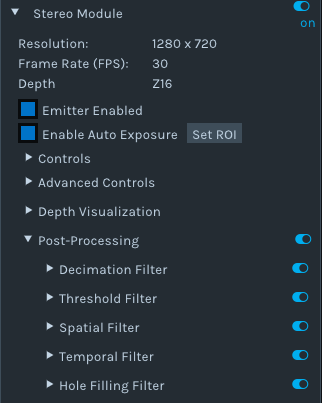
接下來就是之前在第一篇裡面提到的 post-processing
官方說明文件在這裡:

https://github.com/IntelRealSense/librealsense/blob/master/doc/post-processing-filters.md

對我最重要的是hole filling 把整個畫面都有數值
不過其實做到現在反而我都還沒有放,等到實地測量的資料更多再視情況
因為官方說這是一個很粗暴的填滿,反而會失準
總之,選項就跟viewer裡面看的到的一樣

dec = rs.decimation_filter(1)
to_dasparity = rs.disparity_transform(True)
dasparity_to = rs.disparity_transform(False)
spat = rs.spatial_filter()
spat.set_option(RS2_OPTION_HOLES_FILL, 5)
hole = rs.hole_filling_filter(2)
temp = rs.temporal_filter()

先在loop前定義好濾鏡
然後在裡面套用

depth = dec.process(depth_frame)
depth_dis = to_dasparity.process(depth)
depth_spat = spat.process(depth_dis)
depth_temp = temp.process(depth_spat)
depth_hole = hole.process(depth_temp)
depth_final = dasparity_to.process(depth_hole)

我的來源是這裡:
這是拿到相機後整整五個工作天我才逐漸掌握了怎麼轉譯從C++到python
開始把這個範例作為接下來開發的基底

接下來我的程式碼裡面就是一些幀的資料
var = rs.frame.get_frame_number(color_frame)
print ‘frame number: ‘+ str(var)
time_stamp = rs.frame.get_timestamp(color_frame)
time = datetime.now()
print ‘timestamp: ‘ + str(time_stamp)
domain = rs.frame.get_frame_timestamp_domain(color_frame)
print domain
meta = rs.frame.get_data(color_frame)
print ‘metadata: ‘ + str(meta)

視覺化
在python裡面的套件,適合用的就是opencv,在官方也是用這個

當然還有rosbag跟其他matlab等等,我主要用opencv後來用matplotlib作為尺規做圖
所以 前面提過 pip install opencv-python
然後import cv2
color_cvt = cv2.cvtColor(color_image,cv2.COLOR_RGB2BGR)    #convert color to correct
cv2.namedWindow(“Color Stream", cv2.WINDOW_AUTOSIZE)
cv2.imshow(“Color Stream",color_image)
cv2.imshow(“Depth Stream", depth_color_image)
    key = cv2.waitKey(1)
    # if pressed escape exit program
    if key == 27:
        cv2.destroyAllWindows()
        Break

我先前提過 BGR是opencv預設的打開模式,所以我錄製rgb要轉成bgr
然後設定視窗
waitKey是每個畫面幾毫秒
然後按esc的時候關閉
matplotlib更簡單

from matplotlib import pyplot as plt
plt.imshow(img)
plt.show()

這樣就可以顯示出圖片了
到這裡之後就可以看到畫面了
要做成影片就是範例裡面的
try:
  while True:
然後用wait for frames就可以拿到資料
然後再用opencv 每毫秒更新就是影片了
不過其實stream在跑的時候 不論有沒有wait for frame他都一直在傳資料了
這就是我這個專案的基礎了,接下來就可以開始計算3D距離了

RealSense 學習筆記/教學/分享(二):裝置控制

有些人問我 明明工作看起來也不錯 薪水 環境都不錯 為什麼我還在找?

先看看以下影片

這是去年的發表,當辦公室仍在用2000或是更久以前的方法 花許多時間/人力/眼力的同時

這樣的算法已經準備隨時取代掉這些工作了

你說我會不會怕? 當然會,所以要找能夠更未來性的工作 而不是在這樣養老的小鎮 已暫時的安穩而滿足,必須更向前啊!

繼續閱讀 “RealSense 學習筆記/教學/分享(二):裝置控制"

RealSense learning/turtorial/sharing blog – Chapter Two: More Device Adjustments

So, after the hello world, more controls over the device.

So the pipeline is basically start/stop, and wait_for_frames

And the function of pipeline_profile I haven’t know yet

in this part I will put in the controls before wait_for_frames,

including record file, read file, and others
First, complete the configuration:

Rs.config


enable_stream
Define the stream type and also width/height…
enable_all_streams
Turn on all streams at once
enable_device
Input “serial”
enable_device_from_file
(“filename”,True/False) for repeat_playback or not, either once to the end, or keep looping
enable_record_to_file
(“filename.bag”)
disable_stream
(“stream”,”index”)
disable_all_streams
resolve
can_resolve

the enable stream is mentions before,

config.enable_stream(rs.stream.depth, 640, 360, rs.format.z16, 30)

config.enable_stream(rs.stream.color, 640, 480, rs.format.bgr8, 30)

The options can be found in the Intel Realsense Viewer, color,depth,infrared, resolution, mode, fps.

and the  rest is more related when multiple devices were used
config.enable_record_to_file(file_name)
config.enable_from_device(filename)

these are when recording or reading
enable from device have the option True/False
allow replay or just loop once through all the frame and end
If False, it will be the Runtimeerror of “no frames arrived in 5000″
thats why I had the except in the try loop
——————————————————————————————————————–
device = profile.get_device()

depth_sensor = device.first_depth_sensor()

depth_sensor.set_option(rs.option.visual_preset, 4)

dev_range = depth_sensor.get_option_range(rs.option.visual_preset)

preset_name = depth_sensor.get_option_value_description(rs.option.visual_preset, 4)

https://github.com/IntelRealSense/librealsense/wiki/D400-Series-Visual-Presets#related-discussion

This part is setting the preset as in the Realsense Viewer, and in my need is the preset 4, high density.

The dorodnic of intel he wrote on loop to loop through the presets.


which he mentioned the preset numbers are changing all the time, I suppose its among other devices, at least in this same machine it stays

recorder = device.as_recorder()
pause = rs.recorder.pause(recorder)
playback = device.as_playback()
playback.set_real_time(False)
playback.pause()
playback.resume()

Recorder will start recording when in the configuration set,with function or .pause() and .resume()

And the next is playback

This is playing the recorded bag file


pause
Pause and resume, while resume it always turn really slow and lag, until it catch up with the frames
resume
file_name
I haven’t use these functions
get_position
get_duration
is_real_time
Set to the real time behavior as recorded time
set_real_time
Usually I set to set_real_time(False) so I can go through each frame to measure, or else the pipeline will keep the frames looping as real time behavior when its (True)
config.enable_record_to_file(file_name)
So I suppose it can open one bag and record this playback to a new file, while
rs.config.enable_device_from_file(config, ‘123.bag’)
Does Not enable the same time
config.enable_record_to_file(file_name)
current_status


Intrinsic/Extrinsic

depth_stream = profile.get_stream(rs.stream.depth)
inst = rs.video_stream_profile.intrinsics
#get intrinsics of the frames
depth_intrin = depth_frame.profile.as_video_stream_profile().intrinsics
color_intrin = color_frame.profile.as_video_stream_profile().intrinsics
depth_to_color_extrin = depth_frame.profile.get_extrinsics_to(color_frame.profile)

These are getting some data of the camera and streams, i use intrinsic to get the calibration while projecting pixels to 3D coordinations

Otherwise I have no other use for them yet, as I go through the files the usage would be more in 3D models also, while creating by scanning, the accuracy is a lot more important in smaller scales

——————————————————————————————————————
So this part is without example codes because it’s a more general usage for all files
which will be used in most further codes I will be demonstrating.
and I just got the use of turn off auto exposure today, will put it in in the future
the usage of turning it off is for not drop frames.
this is also one of my major issues 
I need to make it act as a camera, and every frame I took should be reachable
but the wait_for_frame is currently not giving me all the frames, and also not recording or recorded too much
if any pros saw this, please write in the comments or send me an email about this topic.
thank you!